Integrations
Your tools, in the same office.
You don’t have to change your company’s tools. Arcade brings into the office what you check most in Google Workspace, Monday and GitHub, and everything else still happens where it always has.
Arcade, your remote team’s digital office, connects with Google Workspace to sign in, book rooms in Calendar and save recordings to Drive; with Monday, to see and update your tasks in a side panel; and with GitHub, to see your pending reviews, CI status and alerts, without leaving the office.
Work is everywhere.
Tasks live on a board, reviews on another site and meetings in the calendar. Knowing what’s next means opening five tabs, and what you don’t see gets forgotten.
How it works
- 01
Google Workspace: sign in and meet.
You sign in with your company’s Google account. Every Arcade room is also a Calendar room: booking it on one side reserves it on the other, and five minutes before, the office gives you a heads-up with “Go to the room”.
- 02
Monday: your tasks in a panel.
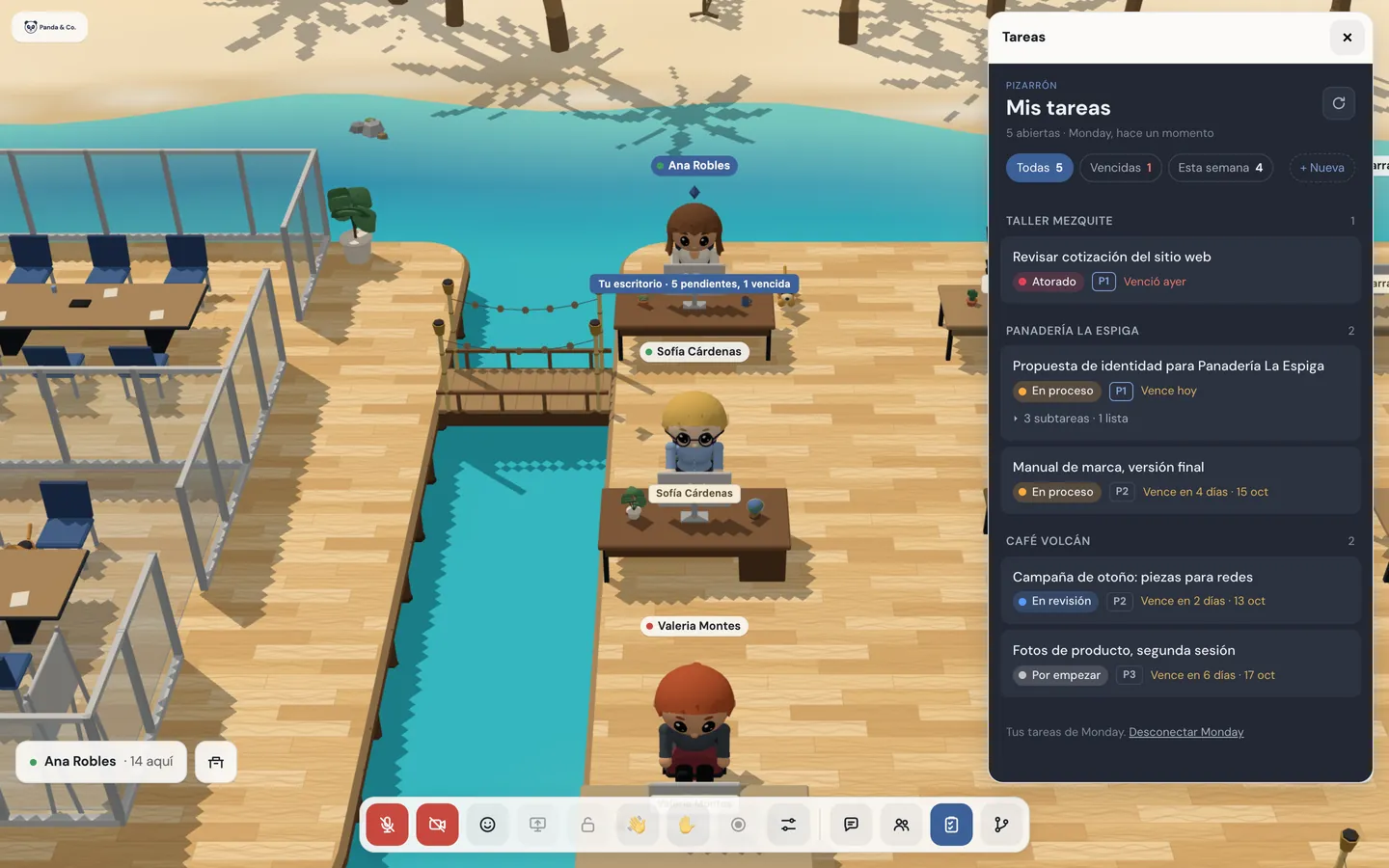
You see and update your tasks (status, priority, dates, people and subtasks), create new ones and comment with images. Your to-dos and overdue items show on the sign at your desk, which only you see.
- 03
GitHub: what’s waiting on you.
A panel with what you’re asked to review, your PRs with their CI, alerts and updates. A counter on the bar says what’s waiting on you, without chiming or interrupting.
- 04
A screen for the dev team.
A piece of furniture placed with the editor that shows the organization’s repos: whether the main branch is green or red, its open PRs and, only to those who can see them, the alerts.

What’s included
Sign in with Google WorkspaceWith Google Workspace
Only your company’s domains, plus people you invite by email.
Rooms in Google CalendarWith Google Workspace
Booked from either side, and the event link opens the office right in the room.
Heads-up before every meetingWith Google Workspace
Five minutes before, with “Go to the room”, which walks you to a free chair.
Automatic “in a meeting” statusWith Google Workspace
During the event, and it goes back on its own when it ends.
Recordings and notes in DriveWith Google Workspace
In a shared drive of your company, attached to the event.
Monday boardWith Monday
Your tasks with status, priority, dates, people and subtasks, comments with images and new tasks.
To-dos at your desk
Your to-dos and overdue items, and what’s waiting on you in GitHub, only for you.
GitHub panelWith GitHub
Review requests, your PRs with their CI, alerts and updates, with a counter that doesn’t interrupt.
GitHub notificationsWith GitHub
Reviews, comments, merged PRs, CI failing or fixed, releases and deployments.
Security alertsWith GitHub
Only for those GitHub lets see them.
GitHub screenWith GitHub
A piece of furniture for the dev area, with up to 12 repos.
On the way
What you’ll have available
- More task tools. In the order our pilot companies ask for them.
- Sign in without Google Workspace. With an emailed code, for companies that don’t use it.
Good to know
- You check GitHub in the office, but you work in GitHub: reviews and merges happen there.
- Monday connects to one board of your organization, and each person connects their own account.
- An admin connects rooms, Drive and webinar emails once; each person connects their own Calendar.
- Today you sign in with Google Workspace.
Privacy
- Each person connects their own Monday and GitHub accounts, and the office only sees what that account can see.
- Nobody sees a repo in the office that they can’t see in GitHub.
- Guests and invited accounts see the GitHub screen turned off, with no repo names.
Questions
Do I have to stop using Monday or GitHub?
No. Arcade brings into the office what you check most; everything else still happens in each tool, as always.
Does it work with other task tools?
Today, with Monday. The next ones arrive in the order our pilot companies ask for them; the waitlist form asks which ones you use.
What does the team see of what I do in GitHub?
Only what GitHub already lets them see. Notifications go to whoever is on each PR, and what you do doesn’t notify you.
Who connects Google Workspace?
An admin connects it once for rooms, Drive and webinar emails. Each person connects their own Calendar if they want meeting heads-ups.
Keep going
- AI meeting notes in your digital officeRecord the meeting, transcribe everyone by name and get AI meeting notes in your company’s Google Drive: summary, decisions and action items with owners.
- Team chat that lives in your officeDirect messages, groups, a team channel and files up to 25 MB, in the same office where your team talks and meets. No other app, no other account.
- FeaturesProximity conversations, meeting rooms, guests without accounts, webinars, recordings with AI notes, chat, and attendance designed with worker wellbeing in mind.
Checked against the product on .
We’re opening a pilot.
A few companies, setup done together, a direct line to the people who build it and a preferential price forever. Join and we’ll write to you.
Join the pilot