Attendance
Attendance without surveillance.
The workday logs itself, with no clocking in and nothing to fill in. Each person sees their own and admins see the team. It measures having the office open, not how much you work, and it says so.
Arcade, your remote team’s digital office, logs each workday on its own: first arrival, last departure, sessions and active time, next to each person’s schedule. Everyone sees their own attendance and admins see everyone’s, with a team dashboard and a spreadsheet to download. It measures having the office open, not working.
Remotely, nobody knows who showed up.
And the usual answers are a time clock or a program that takes screenshots. The first says very little; the second says far too much, and nobody works well like that.
How it works
- 01
Everyone has their own schedule.
Different each day if needed, with blocks for lunch, which don’t count as absence. Changes apply from the next day and are logged, with who made them.
- 02
The workday logs itself.
Opening the office is arriving; closing it is leaving. A break of more than 10 minutes starts a new session. Nobody clocks in or fills anything in.
- 03
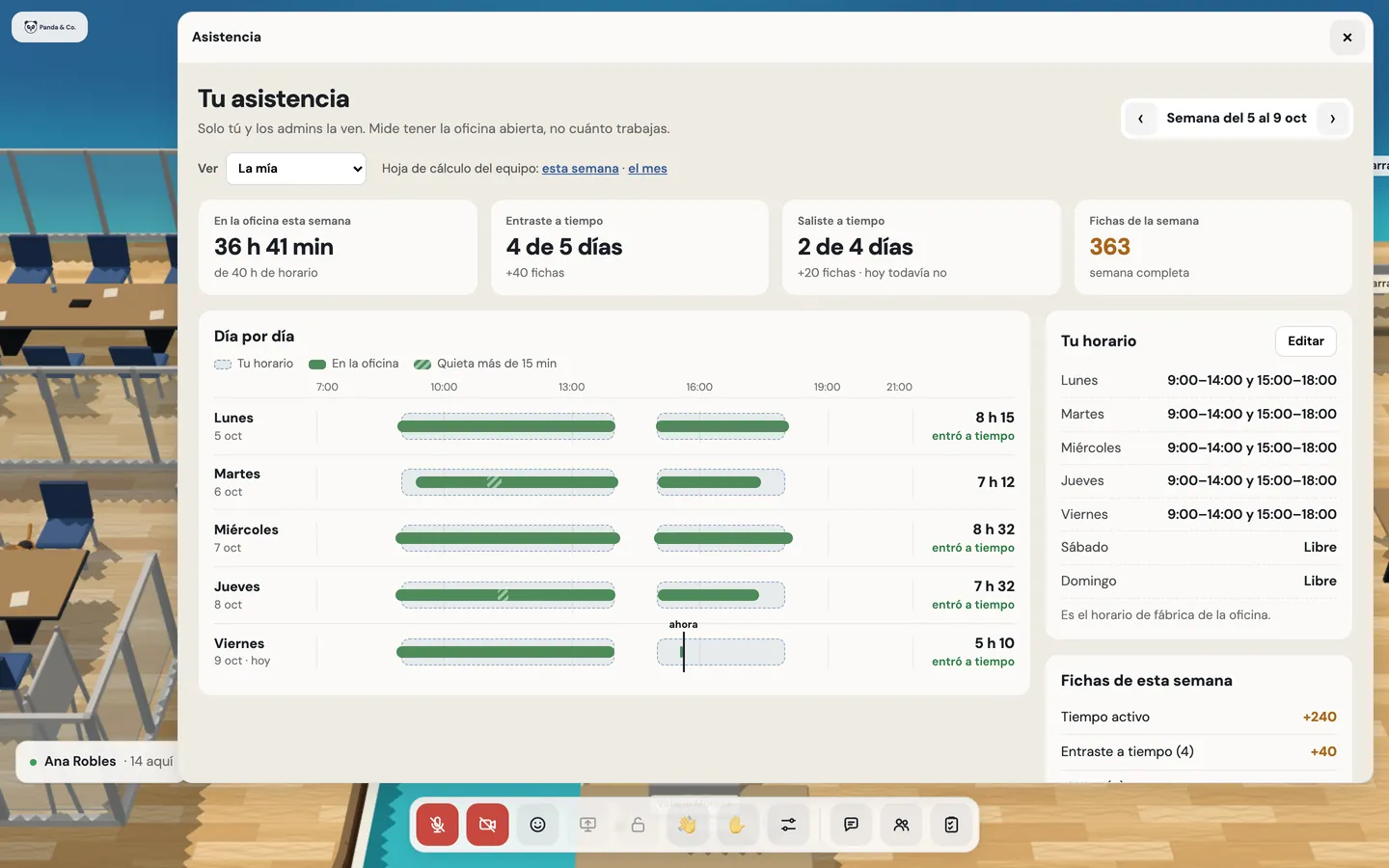
Yours only shows what went well.
You see your week, day by day, against your schedule: “you came in on time”, never “you were late”. Being on time earns tokens; being late takes nothing away.
- 04
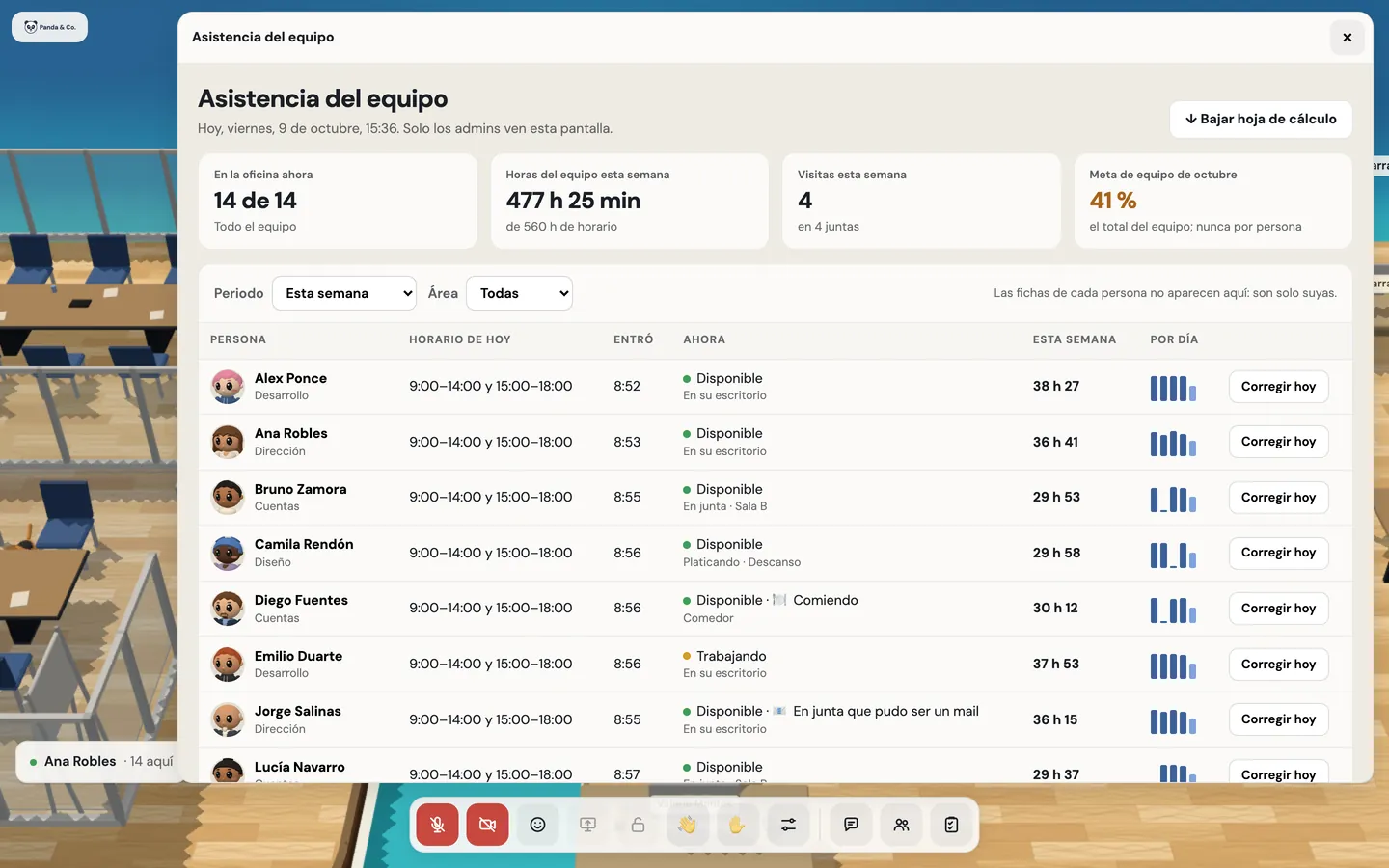
Admins see the team.
Who’s in right now, hours against schedule, the week’s guests and the team goal, with a filter by area and a spreadsheet to download. No one’s tokens.


What’s included
Automatic workday
First arrival, last departure, sessions, and active and idle time.
Schedule per person
Different each day, with blocks and lunch.
Days off
Holidays, your company’s non-working days and each person’s Calendar out-of-office.
Your attendance, for you
By day and by week, with your schedule beside it.
Team dashboard
For admins only, with a filter by area.
Spreadsheet
Attendance for a period, to download.
Fix today’s schedule
An admin adjusts it with a reason, and it’s logged.
On time in and out, no penalties
With a 10-minute margin. They only earn tokens; they never take any away.
End-of-day notice
Just once, when your leaving time comes.
People and permissions
Admin, member and guest roles, invitations, blocks and the history of every change.
On the way
What you’ll have available
- Your organization’s panel. Domains, logo, schedule and tokens, without asking us.
Good to know
- It measures having the office open, not working: active time doesn’t say how much someone did.
- It doesn’t take screenshots or see what you do in other windows or apps.
- Fixes change the day’s schedule, with a reason; logged arrival and departure times can’t be edited.
- Until the organization panel arrives, we set up your own non-working days and default schedule with you.
Privacy
- The welcome tells each person what’s logged and who sees it, and the full explanation is always in their menu.
- Each person sees their own; admins, everyone’s; nobody else.
- Each person’s tokens are private, from admins too.
Questions
Do people have to clock in and out?
No. Opening the office is arriving and closing it is leaving; the workday logs itself.
What happens if someone is late?
Nothing bad: they just don’t earn the on-time tokens. Their view only shows what went well.
Can I download attendance as a spreadsheet?
Yes. Admins download it for a period. Use it as a reference: it measures having the office open, not hours worked.
Does it account for public holidays?
Yes: Mexico’s federal holidays, your company’s non-working days and each person’s Calendar out-of-office.
Keep going
- Remote wellbeing, with NOM-035 in mindArcade was designed with Mexico’s NOM-035-STPS-2018 in mind: the workday ends, nothing is measured behind anyone’s back, tokens are never taken away and there’s no leaderboard.
- Proximity chat in a 3D officeWalk up to someone and within 2 seconds you can hear and see each other, no links or scheduling. Up to 8 per conversation, rooms for more, and nobody ends up on a call by accident.
- FeaturesProximity conversations, meeting rooms, guests without accounts, webinars, recordings with AI notes, chat, and attendance designed with worker wellbeing in mind.
Checked against the product on .
We’re opening a pilot.
A few companies, setup done together, a direct line to the people who build it and a preferential price forever. Join and we’ll write to you.
Join the pilot