Proximity chat
Walk up and you’re already talking.
Like an office hallway: you walk up to someone and the conversation starts; you walk away and it ends. No links, no scheduling, no waiting to be let in.
In Arcade, your remote team’s digital office, conversations form by proximity: two people who stop near each other can already hear and see each other, within 2 seconds and without clicking anything. Whoever walks up joins and whoever walks away leaves. Up to 8 fit in a conversation; for more people there are rooms.
A video call gets scheduled.
Remotely, “got a minute?” turned into a message, a link and ten minutes of waiting. The two-minute question never gets asked, or it turns into a half-hour meeting.
How it works
- 01
You walk up to someone.
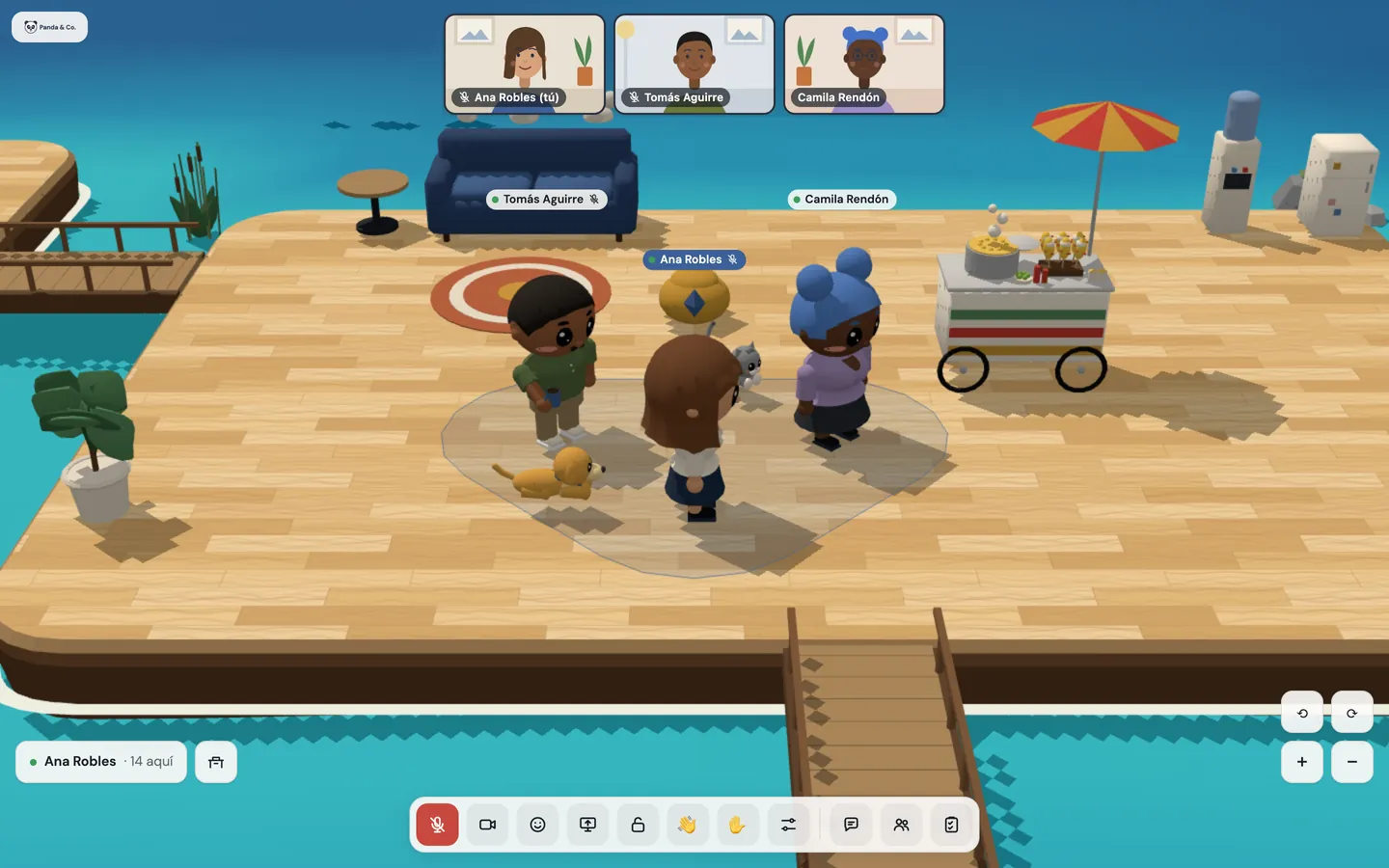
Two steps away you’re already in the same conversation: voice and camera, if it’s on, connect within 2 seconds. An outline on the floor tells everyone else a conversation is happening there.
- 02
Whoever arrives joins; whoever leaves, leaves.
The conversation belongs to the group: everyone hears everyone. To leave, just walk away, and the voice cuts instantly, with no echo. If you need privacy, anyone in the conversation can lock it.
- 03
Nobody ends up on a call by accident.
Two people sitting at their desks don’t count as close. Whoever is on “do not disturb” doesn’t join proximity conversations, and whoever is working joins muted.
- 04
For more people, a room.
Inside a meeting room everyone hears everyone, regardless of distance and without the limit of 8. In meeting mode the videos take up almost the whole screen, and a shared screen goes big.

What’s included
Proximity conversations
They form at two steps and you leave past three, so standing at the edge doesn’t make you pop in and out. Up to 8 people.
Voice and video within 2 seconds
No clicks. On a bad connection, voice comes first.
Lock
Anyone in the conversation closes it so nobody else joins, and opens it again.
Raise your hand
With ✋ or the H key, with its numbered turn next to your name.
Wave and call
A 👋 to anyone, wherever they are, or call them to your desk or a room: they answer “On my way” or “Not now”.
Screen sharing
In a conversation or a room, big and full screen.
Camera grid
Up to 6 at once without scrolling, on a monitor or a phone.
Rooms and meeting mode
One conversation for everyone inside, with no limit on people.
Floating window
To follow the conversation from another tab, with mic and camera buttons.
Backgrounds and touch-up
Blur, backdrops we painted or your own image, and a subtle touch-up.
Status and notes
Available, working, do not disturb or away, and notes that clear themselves.
Good to know
- 8 fit in a conversation. For more, a room, which has no such limit.
- On phones and in some browsers you can’t share your screen; the button explains why.
- In Safari, the floating window shows only the video and the camera has no backgrounds.
- On a bad connection, video goes first and voice last, and a weak-network notice shows up.
Privacy
- Hallway conversations are never recorded.
- Each conversation’s chat lasts as long as the conversation: it isn’t kept.
- Your camera turns on when you want it to; you can talk with voice only.
Questions
Do I have to click to join a conversation?
No. You stop near someone and you’re already talking; to leave, you walk away.
How do we talk without anyone barging in?
Anyone in the conversation can lock it, and whoever walks up sees it’s closed. For something long or with more people, a room is better.
Will people interrupt me while I work?
If you’re on “do not disturb”, nobody pulls you into a conversation by walking up. And whoever is sitting at their desk doesn’t end up on a call with their neighbor.
What happens if my headphones disconnect?
The office switches to the system’s microphone and speakers on its own, and lets you know.
Keep going
- Team chat that lives in your officeDirect messages, groups, a team channel and files up to 25 MB, in the same office where your team talks and meets. No other app, no other account.
- Client meetings with no account or installYour client opens a link, types their name and is in your room within seconds, from a phone too. A waiting room with your brand, and they see nothing outside their room.
- FeaturesProximity conversations, meeting rooms, guests without accounts, webinars, recordings with AI notes, chat, and attendance designed with worker wellbeing in mind.
Checked against the product on .
We’re opening a pilot.
A few companies, setup done together, a direct line to the people who build it and a preferential price forever. Join and we’ll write to you.
Join the pilot